- Published on
Getting Started with External Secrets Operator on Kubernetes using AWS Secrets Manager


4 min read
Introduction
ESO provides the same ease of use as native Secret object and provides access to secrets stored externally. It does this by extending Kubernetes with Custom Resources, which define where secrets live and how to synchronize them. In simple terms, ESO makes API calls to retrieve secret data from the external secrets service like AWS Secrets Manager and injects the secret data as Kubernetes Secrets object.

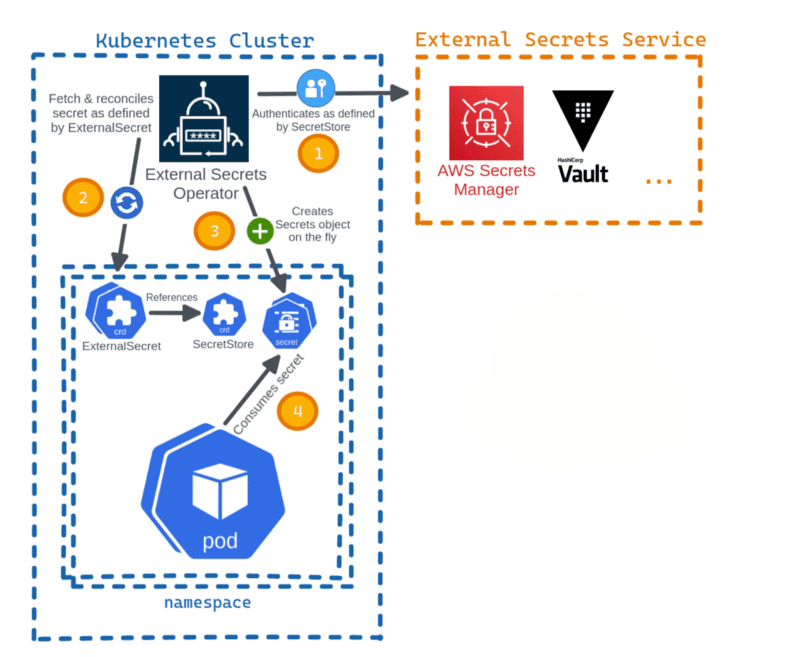
Key Concepts:
- External Secrets Controller — A Kubernetes controller that fetches secrets from an external API and creates Kubernetes secrets. If the secret from the external API changes, the controller reconciles the state in the cluster and updates the secrets.
- ExternalSecret — A custom resource definition that specifies what secret data to fetch. It references SecretStore which knows how to access that data. The controller uses the ExternalSecret as a blueprint to create secrets.
- SecretStore — A custom resource definition that specifies the access needed to fetch the secret from the external API. SecretStore takes care of authentication and access. 4, ClusterSecretStore — A global, cluster-wide SecretStore that can be referenced from all namespaces. You can use it to provide a central gateway to your secret provider.
- SecretStore — A namespacedSecretStore that can only be referenced from a single namespace
Install External Secrets Operator using Helm
helm repo add external-secrets https://charts.external-secrets.io
helm repo update
Install ESO in external-secrets namespace
helm upgrade --namespace external-secrets --create-namespace --install --wait external-secrets external-secrets/external-secrets
Verify ESO installation
kubectl -n external-secrets get all
Create an IAM user and attach the managed policy
aws iam create-user --user-name external-secrets
aws iam attach-user-policy --user-name external-secrets --policy-arn arn:aws:iam::aws:policy/SecretsManagerReadWrite
aws iam create-access-key --user-name external-secrets
echo -n "REPLACE_ME_WITH_YOUR_ACCESS_KEY" > access-key
echo -n "REPLACE_ME_WITH_YOUR_SECRET_KEY" > secret-access-key
kubectl create secret generic awssm-secret --from-file=./access-key --from-file=./secret-access-key
Create app secret in AWS Secret Manager
aws secretsmanager create-secret --name app-secret --secret-string '{"username":"bob","password":"abc123xyz456"}' --region us-east-1
Create a cluster-scoped secret store
A cluster-scoped secret store allows referencing the secret store from any namespaces, which is convenient to use as a central gateway to the secret provider, rather than creating a secret store per namespace.
cat > cluster-secret-store.yaml <<EOF
apiVersion: external-secrets.io/v1beta1
kind: ClusterSecretStore
metadata:
name: global-secret-store
spec:
provider:
    aws:
    service: SecretsManager
    region: us-east-1
    auth:
        secretRef:
        accessKeyIDSecretRef:
            name: awssm-secret
            key: access-key
            namespace: default
        secretAccessKeySecretRef:
            name: awssm-secret
            key: secret-access-key
            namespace: default
EOF
kubectl apply -f cluster-secret-store.yaml
kubectl describe clustersecretstore global-secret-store
Create ExternalSecret to fetch the secret data
kubectl create namespace app

spec.refreshInterval is set to 1 minute, meaning reconciliation will take place every minute.
spec.secretStoreRef is set to ClusterSecretStore namedglobal-secret-store which we created before.
spec.target.name specifies the name of the secret object that will be created in the same namespace, where ExternalSecret is created.
spec.dataFrom specifies the secret name in the AWS Secrets Manager as key and extract tells it to retrieve all key/value secrets.

cat > app-secret.yaml <<EOF
    apiVersion: external-secrets.io/v1beta1
    kind: ExternalSecret
    metadata:
    name: app-secret
    spec:
    refreshInterval: 1m
    secretStoreRef:
        name: global-secret-store
        kind: ClusterSecretStore
    target:
        name: app-secret
        creationPolicy: Owner
    dataFrom:
    - extract:
        key: app-secret
EOF
kubectl -n app apply -f app-secret.yaml
kubectl -n app get externalsecret
kubectl -n app get secret app-secret
Consume the secret from the Pod
cat > app-pod.yaml <<EOF
    apiVersion: v1
    kind: Pod
    metadata:
    name: app-pod
    spec:
    containers:
        - name: app
        image: k8s.gcr.io/busybox
        command: [ "/bin/sh", "-c", "env" ]
        envFrom:
        - secretRef:
            name: app-secret
    EOF
kubectl -n app apply -f app-pod.yaml
kubectl -n app logs app-pod | egrep 'username|password'